
 cs
cs en
enSolar Monitor User Guide
- Quick Setup
-
- Overview
- How to Install?
- Quick Start
- Factory Reset
- Web
-
- Extension Modules
Menu Alerts enables selecting the way of informing the user about alarms.
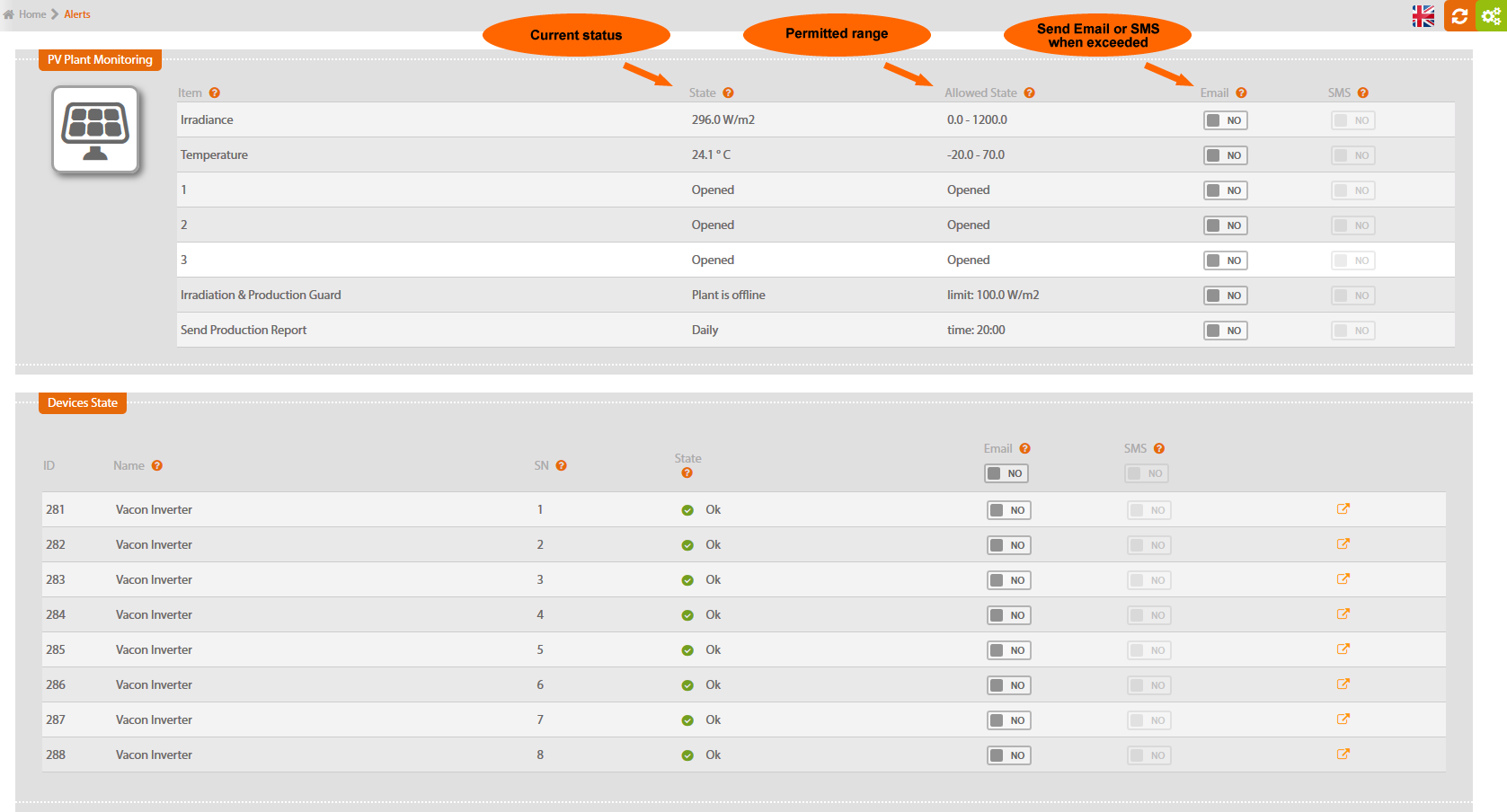
Table shows monitored components of a PV plant, their current status and limit values. It enables setting up the way of informing the user about alarms via e-mail or SMS. You can set up the limit values of sensors in the v menu “System set up\Sensors and alarms”, see chapter 4.1.3 Sensors & Alerts.
Sensors
If any sensor connected to the unit exceeds the limit values, a notification to the user is sent.
Sensors in default setting have 60 seconds delay, inverters 5 seconds delay. Further info on setting up the delay in chapter 4.1.3 Sensors and alarms.
Inputs
When input status (connected / disconnected) changes in a way not allowed by the user, a notification to the user is sent immediately.
Irradiation production check
If irradiation exceeds preset limit value and the inverter doesn't produce power, a notification is sent. Irradiation sensor is essential for this function.
Sending production report
A production report (selected type of message) is sent to the user in preset intervals.
If a failure is detected at the device (e.g. inverter), a notification to the user is sent immediately.


